01
Contacts and a timeline
- Every customer and company in one place, built from the tickets you already have.
- A running history of each relationship, updated automatically.
Powerful tech. Simple enough for anyone.
Poetic Halo helps businesses set up, optimize, and automate their tech stack so your team spends less time fighting tools and more time doing the work.
NewTriage Week · support triage for Zendesk teams
One week. Fixed price. Done by an expert.
Your queue gets sorted, routed, and handed back to your team in five working days. We do the setup inside your own Zendesk, alongside you, and leave you with a system your people understand.
How Triage Week Works
Every day has a job. You'll know what we're doing, why, and what's next. Only after the groundwork is done do we bring in AI, and only where it saves your team real time.
We read a sample of your real tickets and map what comes in, where it goes, and where it gets stuck.
We agree on clear inquiry types, like Billing & Payments or Account Access, and set up the groups, fields, and triggers to route them.
New tickets get sorted into the right category with AI. Anything it isn't sure about goes to a person to review.
We run it on real tickets with your agents, fix the edge cases, and tune the categories until they feel right.
A live walkthrough and a plain-English runbook, so your team can run it, adjust it, and explain it without us.
What You Get
This isn't software you sign up for. Triage Week is a hands-on, five-day setup by someone who has built Zendesk tools agents use every day.
Founding customers pay the full $2,950. It is credited dollar-for-dollar on your next invoice with us, valid for six months.
The credit doesn't stack with other discounts, and it expires if you don't return within those six months.
Ways to Start
Start wherever fits your team. If you begin with the done-with-you install, its fee is credited toward Triage Week.
Warm First Reply, Long Thread Summary, and Tone Polisher. Try them on your own tickets this afternoon.
→The 12 paid prompts, with Grok and Claude versions and wiring notes. No CRM bundle.
→Everything in Prompts only, plus the CRM bundle: the Zendesk CRM builder prompt and the Reply Desk CRM app. 16 prompts in all.
→Includes the full Halo Replies Pack: all 16 prompts plus the Reply Desk CRM app. We wire your top three into Zendesk with you, live, then tune them with you for two weeks.
→Five days: audit, categories and routing, auto-sorting with a person reviewing the unsure tickets, testing, and handover.
Book Triage WeekBuilt on Real Zendesk Work
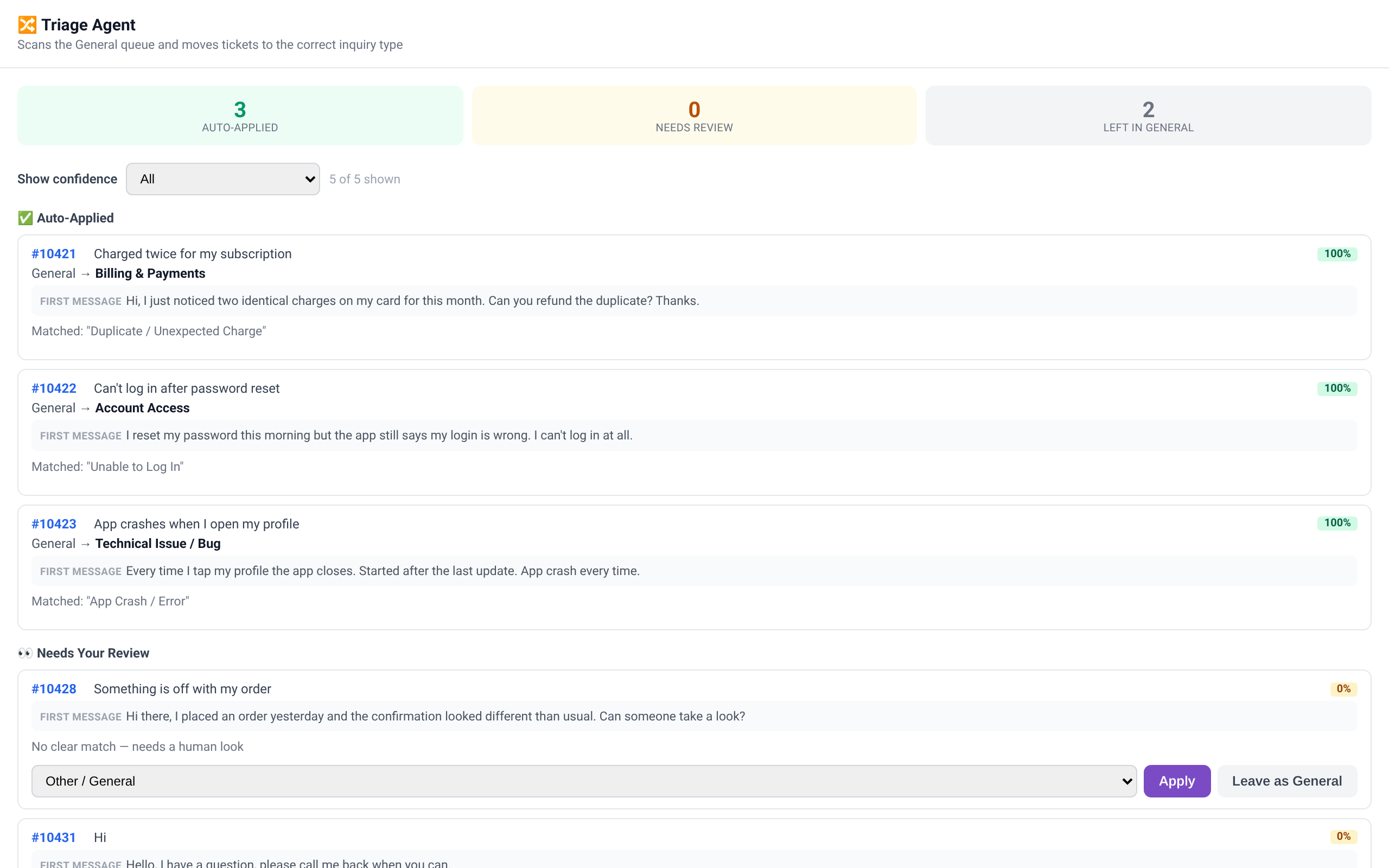
A Zendesk app we built for a consumer gaming company. It auto-sorts tickets from a catch-all queue into the right inquiry type, with a person reviewing the unsure ones.
Triage Week brings the same careful, person-in-the-loop approach to your queue.
Screenshot shows the real app running on sample tickets with made-up customers.
FAQ
No. Triage Week is an expert-led setup inside your own Zendesk, done in five days. There's no new tool to log into. Everything we set up lives in your account, and your team runs it.
A Zendesk account with admin access during Triage Week, a point person on your team for a short daily check-in, and a sample of recent tickets to learn from. If you'd like AI to help with sorting, we'll help you set up an account with the provider you choose.
No. Sorting results land as categories, tags, or internal notes. Anything that goes to a customer is read and sent by a person.
We can keep going with a follow-on build or ongoing help. Founding customers get their full $2,950 credited dollar-for-dollar on their next invoice, valid for six months. It doesn't stack with other discounts and expires if you don't return.
Send us a note. We'll set up a short call, look at your queue together, and pick dates for your Triage Week.
What We Do
Clean data, smart automations, and tools that actually work together.
Set up to fit your team, whether you’re handling ten tickets a day or thousands.
From choosing the right platform to a fully configured, clean system. We handle setup, data migration, custom fields, pipelines, and team onboarding.
Identify where AI can save your team real time. We design and build automation workflows that eliminate manual work without breaking what's already running.
Confused about what tools you actually need? We'll map your current stack, surface the gaps and redundancies, and give you a clear path forward.
Connect your tools so data flows where it needs to go. No more copy-pasting between platforms or leads falling through the cracks.
Map your current processes, find where time and money are being lost, and build systems that let your team operate at full capacity without burning out.
Real-time dashboards that surface what customers are saying, track sentiment trends, and help you act on what's happening now.
A support team was manually sorting and routing hundreds of tickets a day across email and chat. We built an n8n workflow that automatically classifies, prioritizes, and routes every ticket — with an AI-drafted response ready to go.
A team was manually reading through support tickets, reviews, and social mentions each month to spot trends. We built a Claude-powered pipeline that pulls from every channel, extracts themes and sentiment, and feeds a live dashboard so the team always knows what customers are feeling in real time.
New from Poetic Halo · Halo Replies
Halo Replies is a set of 16 ready-to-wire AI prompts for Zendesk, in Grok and Claude versions. They draft replies, summarize long threads, and route tickets, and a person stays in charge of every one.
These prompts come from the same place as the Zendesk apps we built for a consumer gaming company: tools agents open every day. A few of them are below.
Auto-sorts tickets from a catch-all queue into the right inquiry type, with a person reviewing the unsure ones.
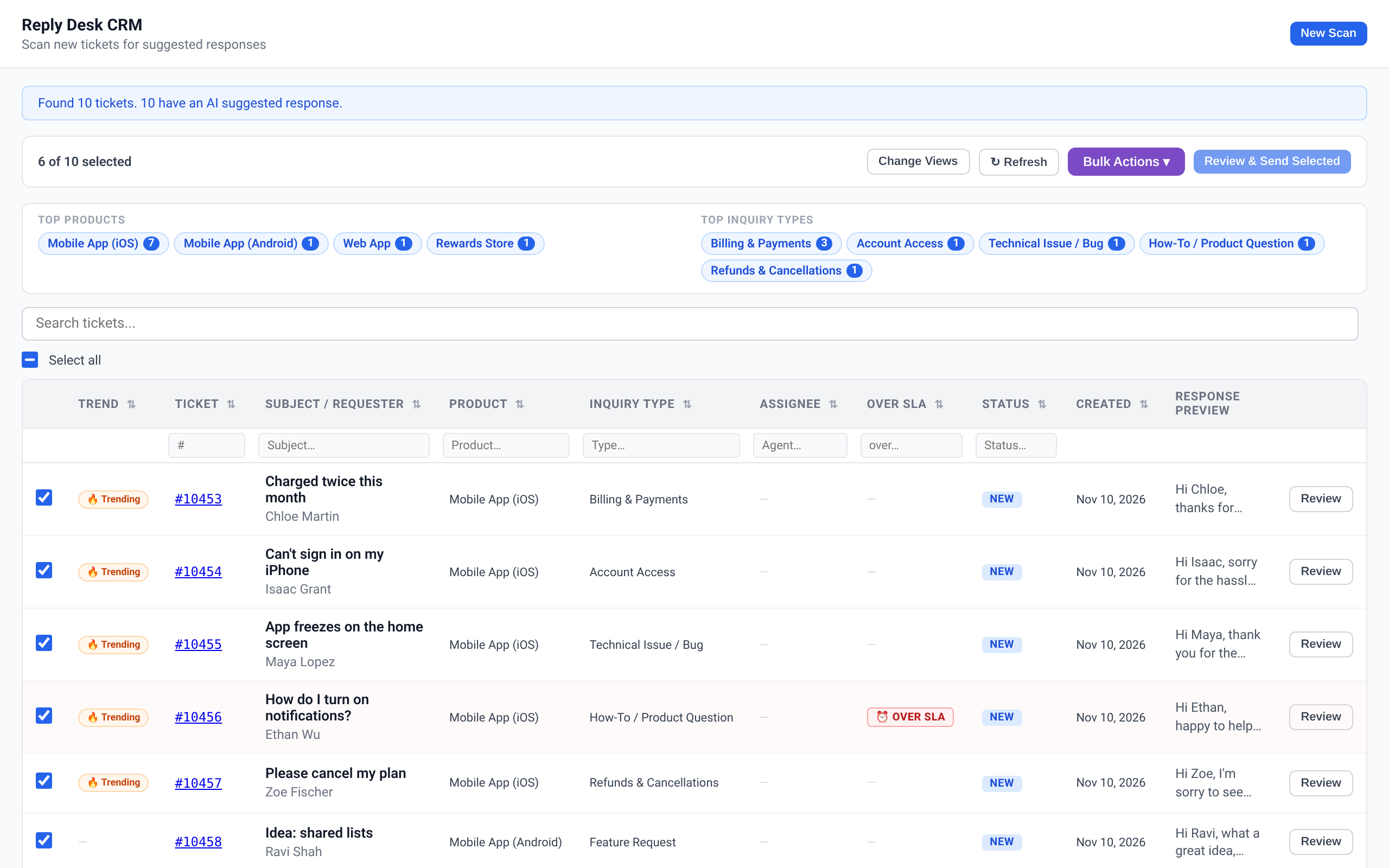
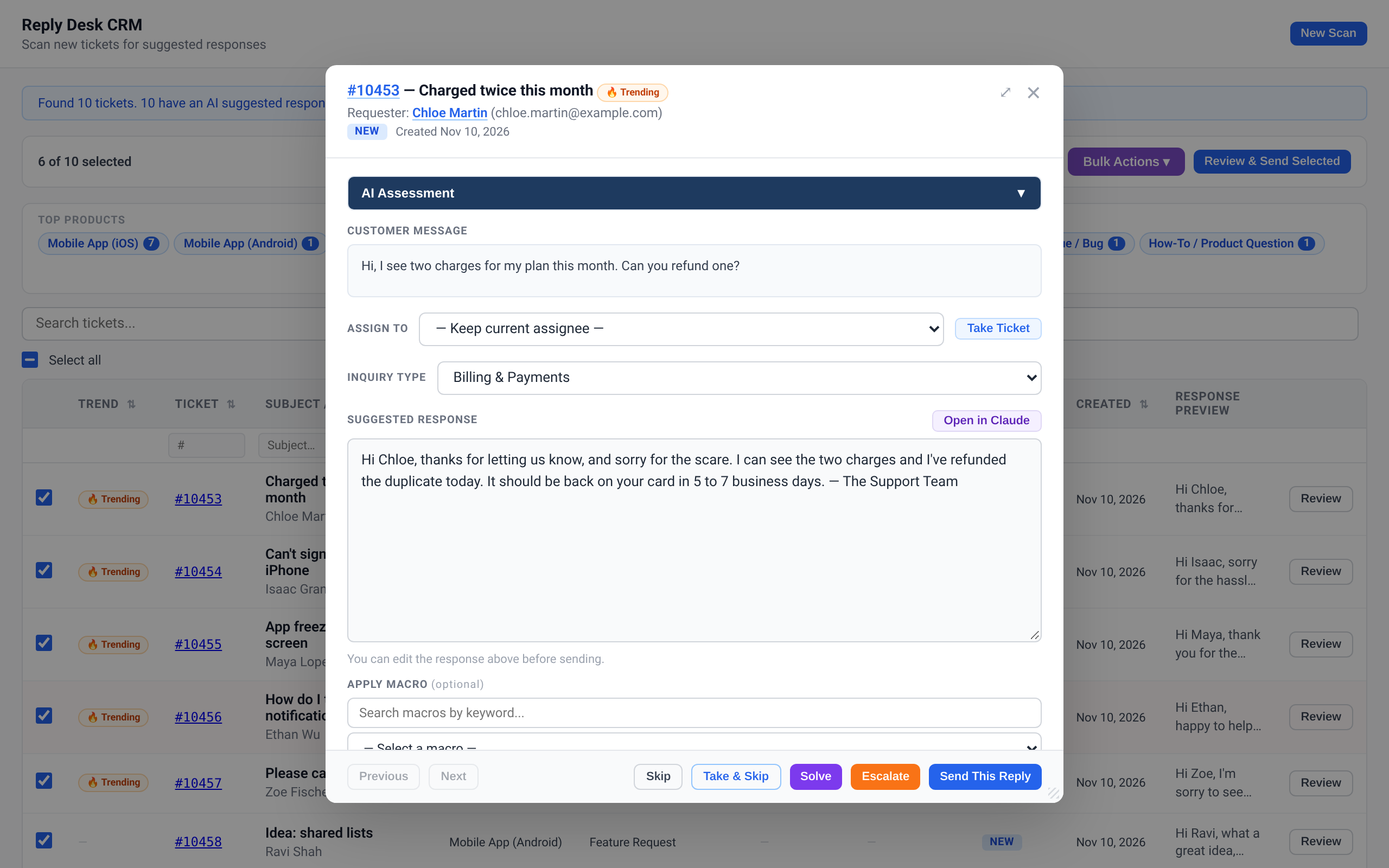
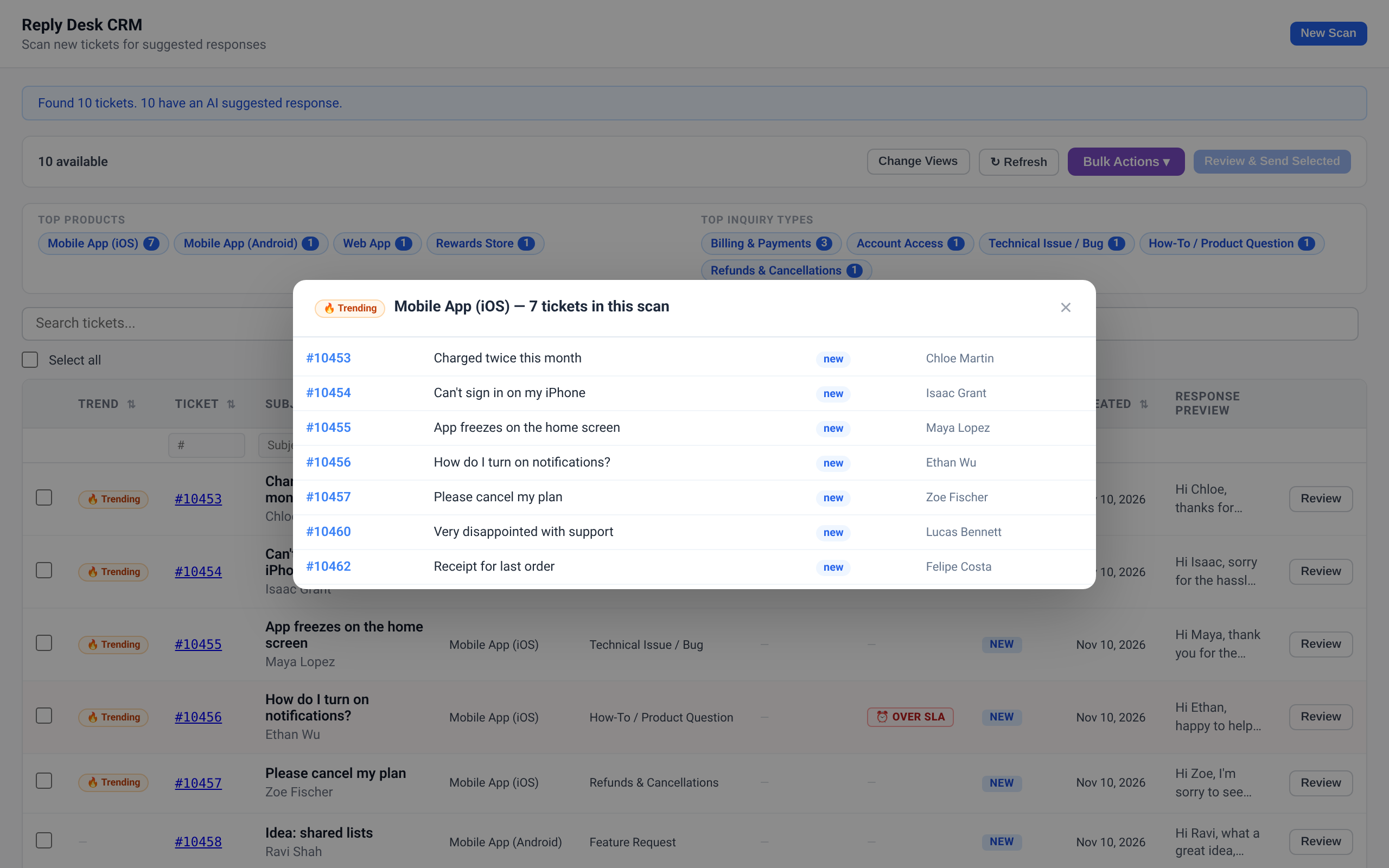
Review, edit and send AI-drafted replies in bulk, with nothing going out until an agent confirms, plus a live view of trending tickets.
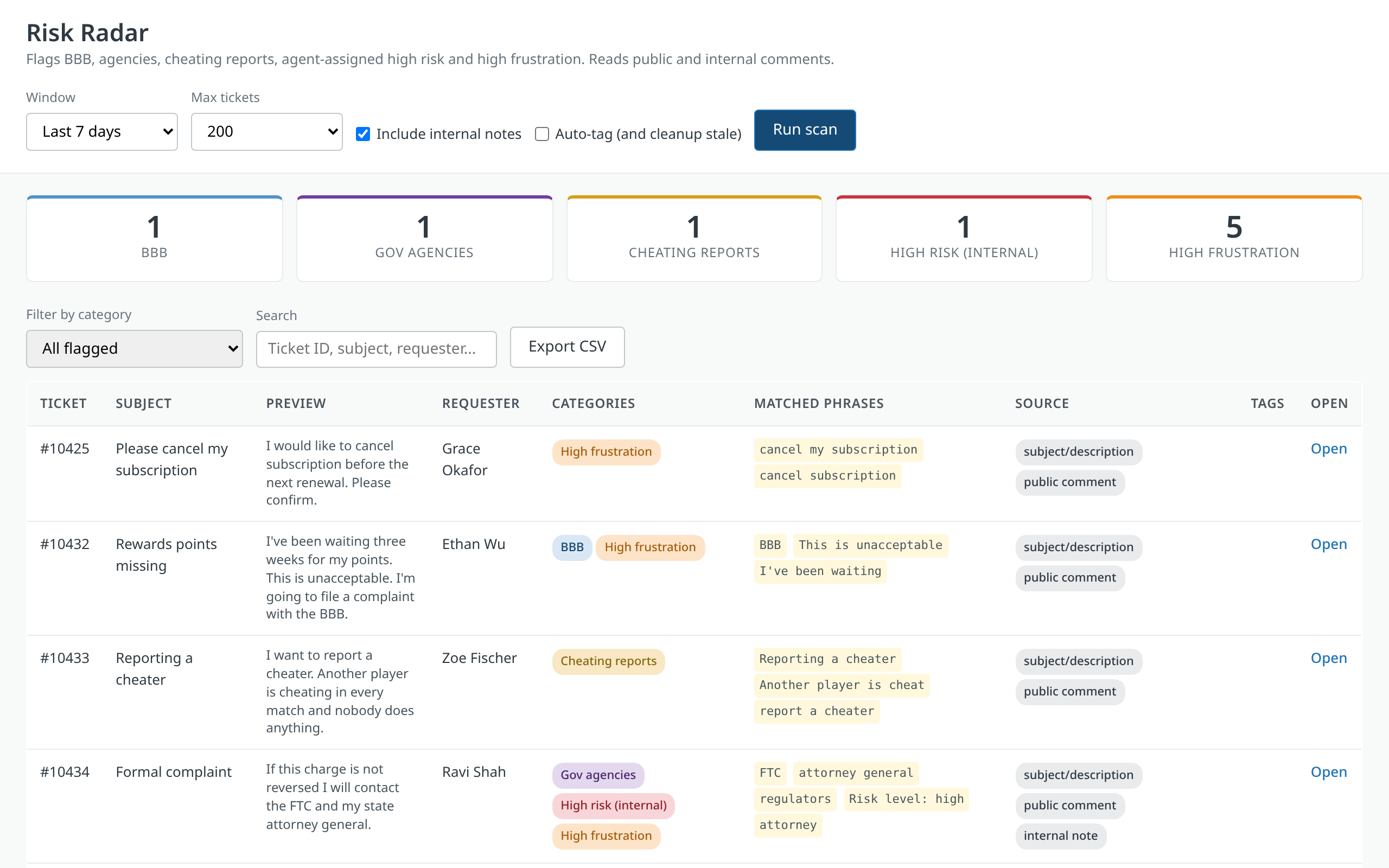
Flags tickets that need extra care, like regulator mentions, cheating reports, and very frustrated customers.
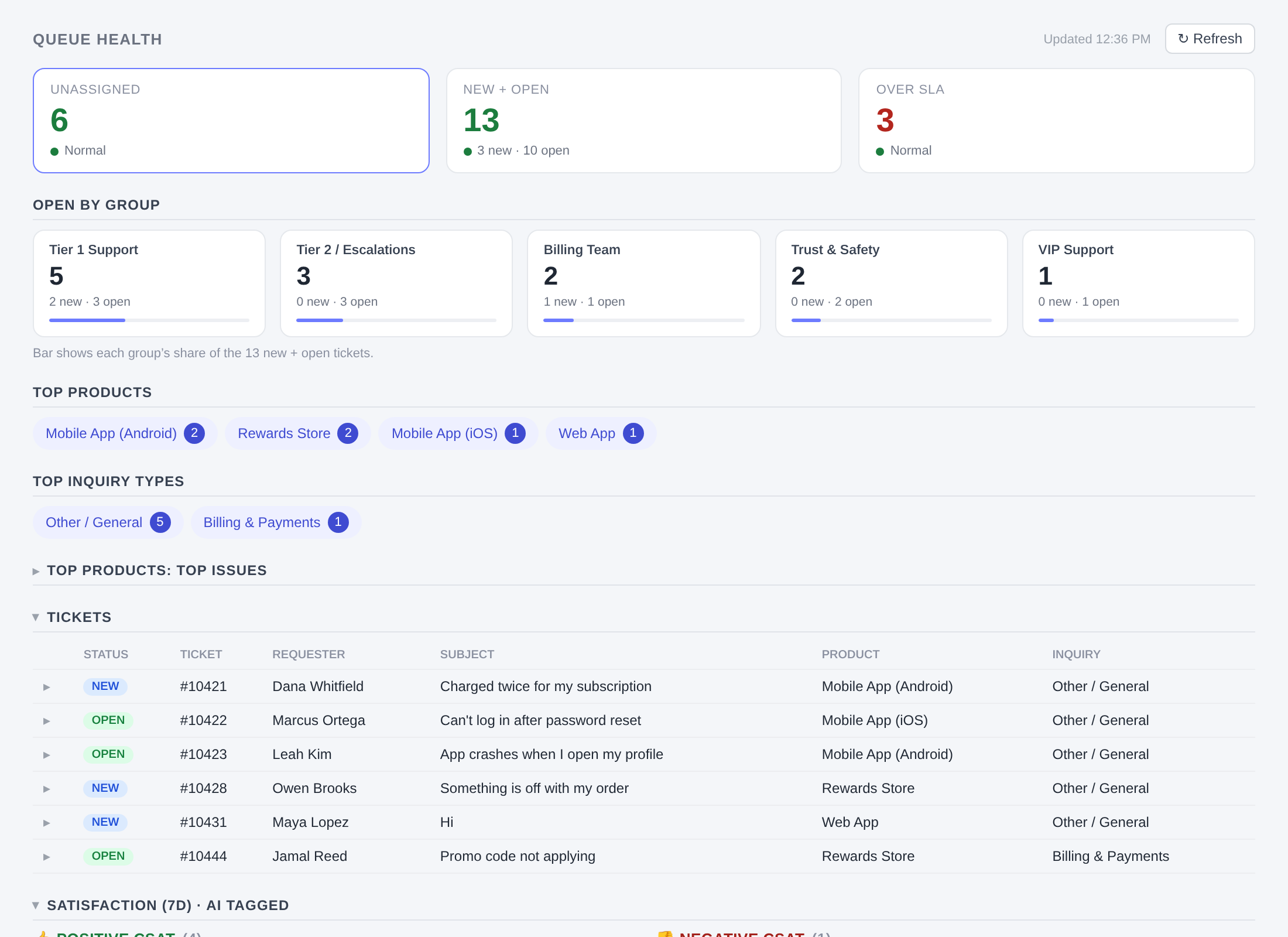
A live view of unassigned, open, and overdue tickets by group and topic, one click from the tickets behind them.
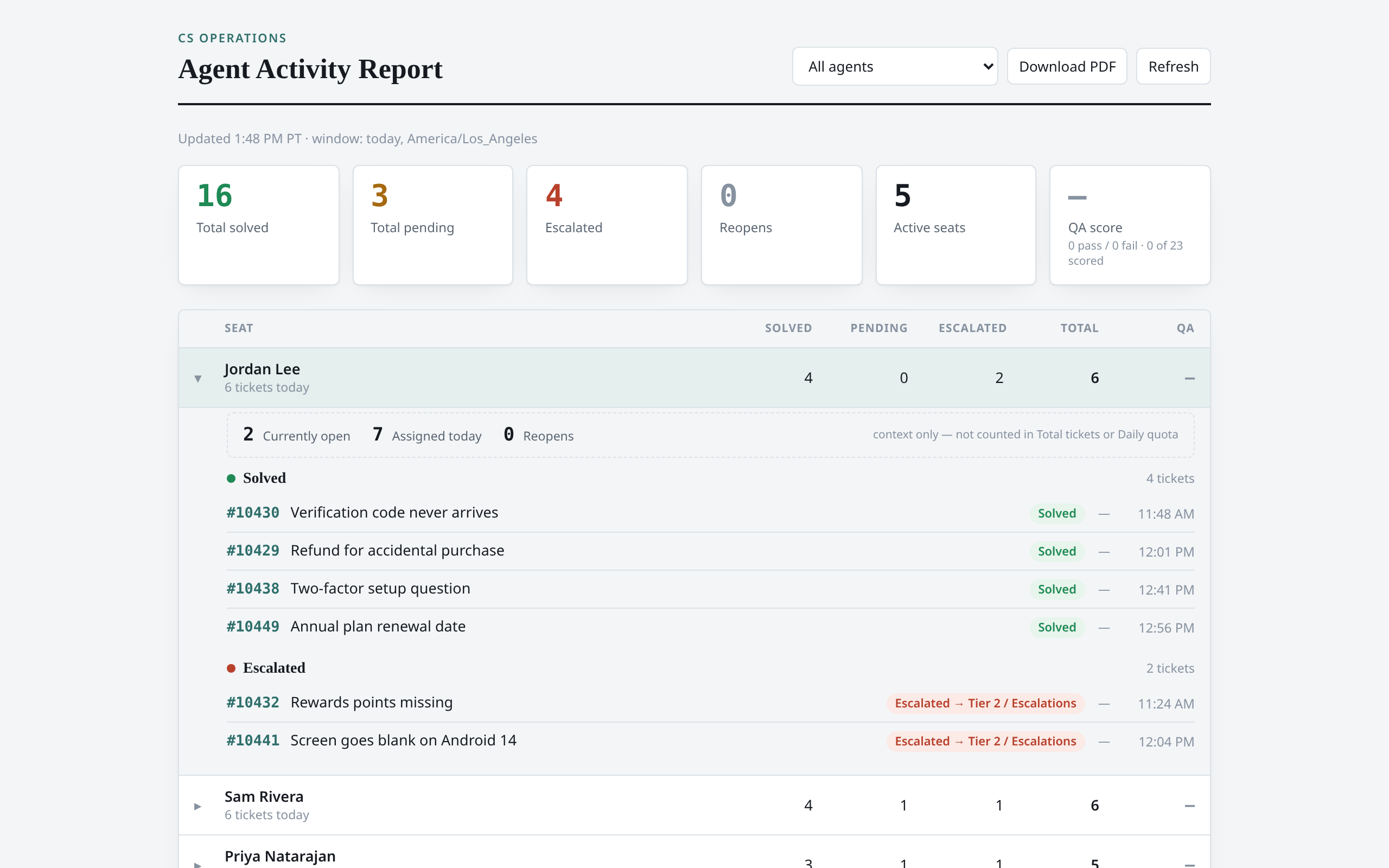
Each agent's solved, pending, and escalated tickets for the day, with a PDF export for team check-ins.
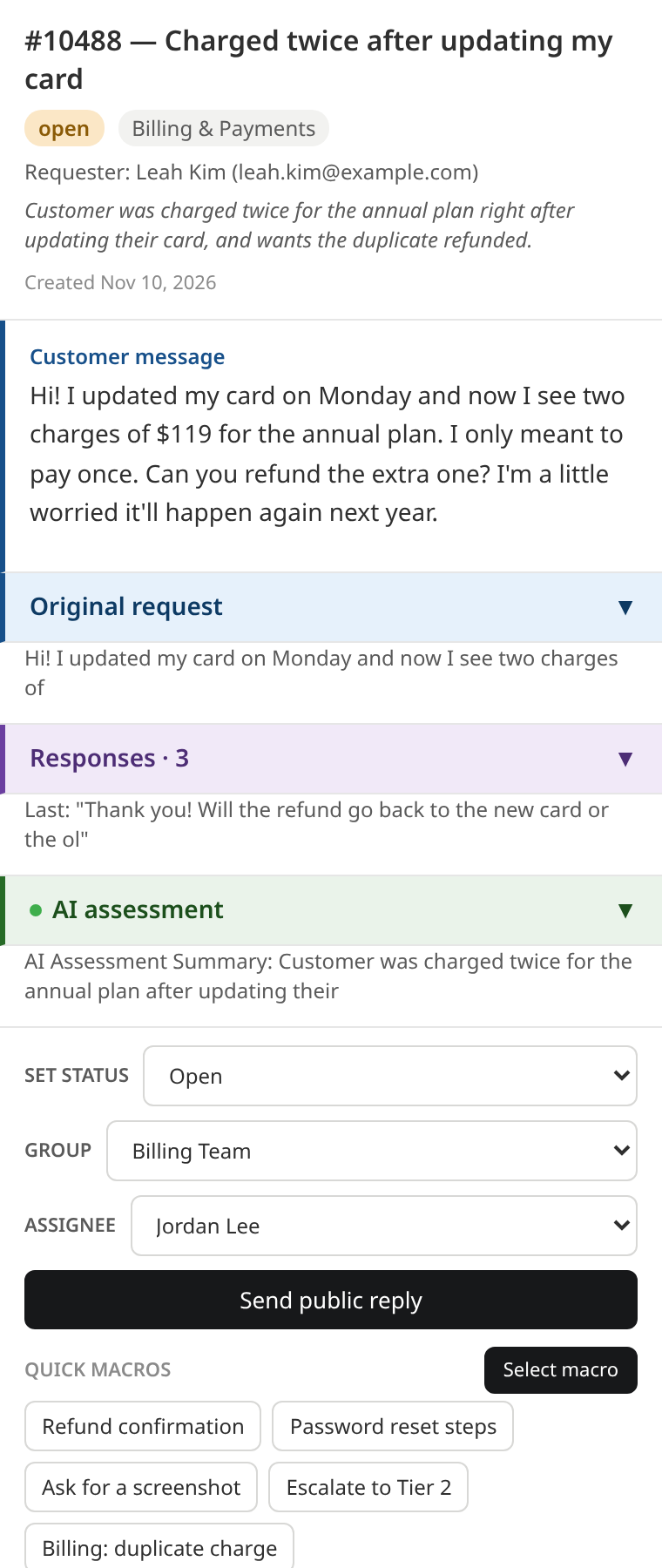
A ticket sidebar with the customer's message up top, a tidy thread, the AI summary, and a quick reply box in one place.
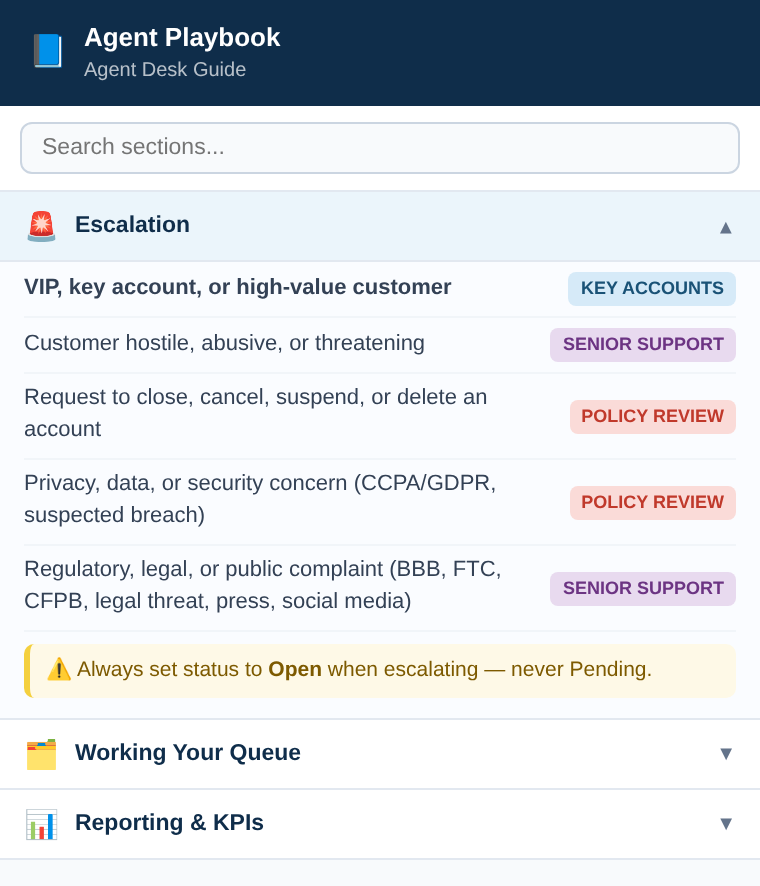
An agent cheat sheet right in the ticket sidebar, so "how do we handle this?" is one glance away.
Screenshots show the real apps running on sample tickets with made-up customers.
Three prompts are free for an email address. The other 12 are $10, or get the full pack with the CRM bundle.
Free
Prompts only
The full pack
Everything in Prompts only, plus the CRM bundle:
Prefer a hand with it? We'll put the prompts to work in your Zendesk with you, or sort your whole queue for you.
Done with you
Done for you
Every result lands as an internal note, a tag, or a field. Nothing goes to a customer until a person reads it and hits send.
See what a warmer first reply feels like on your own tickets. If it helps, the rest is here when you're ready, and so are we.
Get the 3 free promptsIn the full Halo Replies Pack ($99) · Paid
Your customers are already talking to you in Zendesk. Every question, complaint and thank-you lands there first. So why keep the relationship somewhere else, in a CRM nobody updates? This prompt builds a simple CRM where your conversations already happen and keeps it current from the tickets themselves, so your team sees the whole person behind every ticket and no one has to type a thing.
I reset my password this morning and now it says my account is locked. Can you help?
Sorry about that, Priya. I've unlocked your account, so you can sign in again now…
We're adding a few people to the team next month. What would it look like to move up a plan?
Great to hear the team is growing, Sam. Here's how the next plan up compares…
Our renewal is coming up. Before we decide, could we go over how the team has been using things?
Happy to, Alex. Here's a quick look at what your team has used most this year…
Tags
Pipeline
Last interactions
No interaction in 30 days.
This prompt comes with the full Halo Replies Pack ($99, $79 at launch), not the $10 prompts-only tier. If you want it wired into your Zendesk, we'd be glad to talk it through.
Get in TouchAbout
Poetic Halo works at the intersection of technology, customer experience, and business growth.
We build and streamline operations, implement AI and automation workflows, and get messy CRM systems under control. Poetic Halo exists to bring that work directly to the businesses that need it, without the enterprise overhead.
Get in Touch
Tell us what you're trying to fix.